Before you call CQ: rig settings checklist
- AGC off (see "AGC Off" below). Really, try it.
- No TX/RX EQ enabled, can drive you crazy if you forget
- No NR or NB settings enabled, will harm decoding greatly
- No ANF or BC, notch filters, they will hurt decoding
- No speech processor, same reason for RX/TX EQ
- Make sure your RF gain is wide open or that you realize where it is set (AGC off will show no signal level on s-meter)
- Squelch open, on FM in particular for simplex, open the squelch, far better results. With a repeater it doesn't matter much as the assumption is you can hear it anyway if you can get into it.
- Rig set to full power output always, control actual TX power out with your audio drive levels.
Start by getting your audio levels sorted out
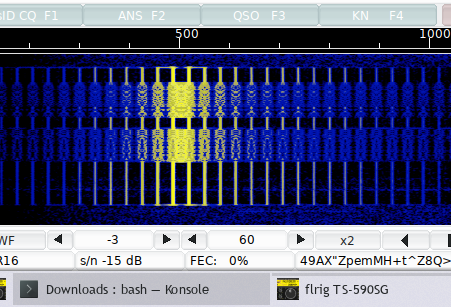
Having your levels correct is critical to maximum effectiveness in both TX quality and also for being able to decode signals properly. In short: run the rig at full RF power and control your output power with the audio drive level, and on receive set the level so the VU meter in fldigi sits around -50 to -40 on an empty passband, with the diamond green (yellow is the upper limit, red is clipping).
Make sure the rig's sound device is not your computer's default device, or all OS noises will go out over your rig. On Windows that's Control Panel → Hardware and Sound → Manage Audio Devices; on a Mac, check Audio MIDI Setup and System Settings → Sound. On Windows I recommend renaming the Playback device to "Rig Drive Level" and the Recording device to "Waterfall Level". You'll need to re-select the devices in your software after renaming, but it makes it a lot easier to remember which line does what.
The full step-by-step is in My article about sound card levels.
AGC Off - How to avoid strong signals flooding you off the waterfall
So this tip you may want to experiment with. Have you ever been in a QSO and had a much stronger signal than the one you were working come in the waterfall and "pump" your signal where you lose decoding? Here's how to avoid that.
When running digital modes, almost always, I turn the AGC on my rig OFF. I run RF gain wide open, set my INPUT audio levels from the rig to the software until proper levels are indicated on the fldigi VU meter. If I get hammered with a very inordinately strong signal that starts to decode poorly, I slowly ride the RF gain back to reduce the signal for processing.
Running the AGC off keeps strong adjacent signals from "pumping" the gain and wiping out weaker signals. It is a massive improvement, particularly if you are working psk-31 or any mode with a lot of close adjacent signals.
If your rig won't allow for AGC to be turned off, if it has an option for fast AGC, set to fast, it will respond better for digi mode use.
Also, double and triple check that you do NOT have any NR or NB filtering enabled as they will really badly affect the ability to decode incoming digital signals.
RxID and TxID - How do people figure out what mode I'm using?
Ever see someone calling and calling but you can't figure out what mode they are using? Try figuring out MFSK vs Domino vs Thor vs Olivia. After enough time you may be able to, but really it's pretty hard. Also what if you like to play with even less common modes like Feld Hell or Throb? Again in time you may recognize them by eye or ear but most people cannot.
The way you fix that is to enable transmitting the RSID encoding at the start of your transmissions. The RSID is a series of tones that identify what mode of TX is to follow. If you set TxID it will send the RSID for the mode when you TX, if you enable RxID you will see what modes people are calling with.
You don't need to enable RSID with every transmission you make, but for calling CQ it should be sent with every CQ call so that people can figure out the mode you are using. Once engaged in a QSO, you can choose to disable it as it's just added traffic with no purpose.
Again with fldigi (noticing a theme here?) you can toggle both RxID and TxID with toggle buttons at the top right of the app and also you can toggle them in the calling macros that automate what you send for a CQ string in a button push.
The one exception to this is when you are working PSK-31 as it is a mode most people recognize right away and tends to be operated in a given passband with others running the same mode. If you are running QPSK or PSK-63F and others beyond the plain BPSK-31, use the ID so people can figure out what you are running.
If you find your rig jumping modes using fldigi and wonder why, go into Configure -> Config Dialog -> IDs and under RSID check the checkbox for "Notify Only" and it will just pop up a window that you can choose to click or not if someone identifies using a different mode. The search passband option allows you to scan the waterfall width for other signal modes.
In nets, you want the notify only box unchecked and you want the "search passband" also unchecked. This will allow you to follow mode changes on the fixed spot you are tuned to as the net progresses, without getting confused by other adjacent signals.
Filters - Use Them
Frequently, during a QSO the contact gets broken due to nearby signal interference. The AGC tip solves an awful lot for this, but there are still times when nearby signals (The FT8 hordes, the piles of various Winlink on top of PSK sections on 20m as examples) can interfere with your contact. If your rig has filters in it, use them. People seem to forget or don't realize they can enable the filters on their rigs.
In the software you are using, when in a contact, most of the time I recommend using the QSY to center or sweet spot to center your contact on 1500 Hz. The reason for this is to optimize for the frequency response of your passband for decoding, but also, because most rigs' filters are centered there or 1 kHz. Once you have the signal centered, you can apply your rig's filters if available.
My rig is a TS-590SG and it has DSP filtering that works really well from 5 kHz down to 200 Hz wide. I typically run the filters 20% or so wider than the mode I'm working, or minimally enough to blank out any adjacent signals. It significantly enhances decoding. As an example, Olivia 16/1000 is roughly 1 kHz wide, so I set the filter about 1200–1500 Hz wide, centered on 1500 Hz. If you go too tight you can negatively affect the decoding. With narrower modes of 500 Hz or 250 Hz I'll run 600 Hz filter or 400 Hz or so.
If you have an older rig with open slots, and do a lot of NBEMS or Olivia work, a 1.8 kHz SSB filter and a 500 Hz filter are very useful to add. If you can only add one filter and don't need message traffic, get the 500 Hz. It covers most chat modes.
If you are fishing for contacts, leave the filters wide open to see what is around. If you are calling CQ in a crowded spot, tighten the filters around your signal.
If TX Hangs - Escape!
I'm sure you've hit a macro that went wrong or had some other issue that hangs TX. Just remember this.
Escape! Escape! Escape! The esc key in fldigi and I believe a bunch of other software will halt TX, it's a good pull cord to have ingrained.